
1. Go to Amazon and type in the search box the product you want to buy.
2. Sort results by Price: Low to High.
3. Look for products with reduced prices that don’t have a label “Prime Day Deal”.
4. Additionally, filter results by average review to see only the best products.
Problem
During Prime Day, it’s hard to find deals that can be grabbed by Amazon customers who are not Prime members. All popular deal sections are Prime-only:
- Gold Box is 100% Prime. You can’t find a product which doesn’t have “Prime Day Deal” badge.
- Deal sections in popular categories are dominated by Prime deals.
- Popular lists set to display featured items start with Prime Day deals.
Solution
If you want to find a regular deal during Prime Day, you can still do it. In fact, there are hundreds of non-Prime deals. The only problem is that it’s hard to find them.
You just need to change your approach:
Don’t look for deals. Look for products that you actually need.
And then the only thing to do is use the right sort option on the list of results.
How to find non-Prime deals during Prime Day – step by step
1. Visit Amazon website and use a search box to select the relevant category.
2. Type a product you want to buy, for instance, “Bluetooth speaker.”
3. Use the small dropdown menu in the top right to change sort option from “Featured” to “Price: Low to High.”
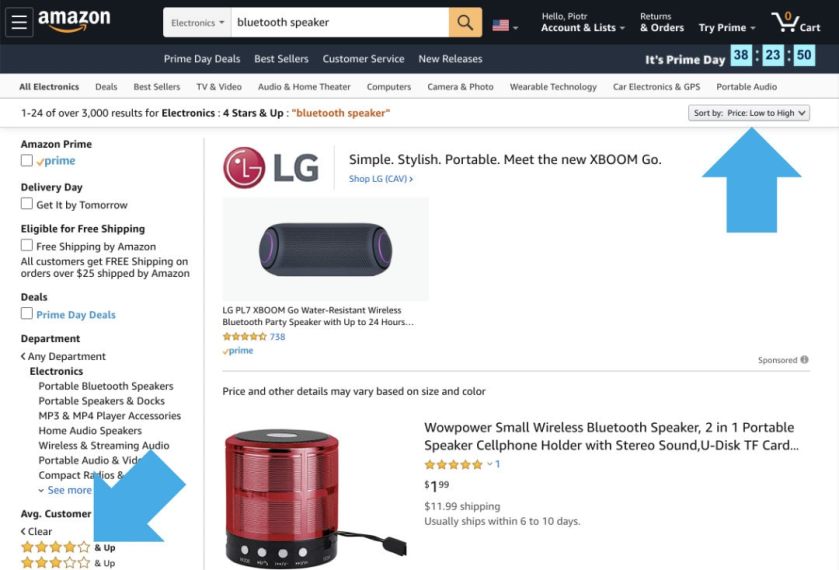
4. To limit the list to highly rated products, in the left sidebar select “**** & Up” in “Avg. Customer Review” section.
5. Look for products which have reduced prices and don’t have “Prime Day Deal” label.

• • •
Keep exploring. Here are other tips and how-to guides:
[gu-archive number=5 tag=”tips”]








 Geek Updated
Leave a reply to Prime Day deal for non-members: save huge on 160 Kindle bestsellers! – Ebook Friendly Cancel reply