
1. When completing a purchase, check the box This is a gift.
2. Leave the rest of shipping details unchanged.
3. Make sure you have provided the right shipping address.
Amazon devices are usually shipped registered with the credentials of the buyer. This way, you can start using a new Kindle e-reader, Amazon Fire tablet, or Echo smart speaker without the need to go through the procedure of registering the device.
Some users, especially the ones who are concerned about privacy, prefer to use a “clean” Kindle without connecting it to their Amazon account.
How to make a Kindle shipped unregistered to you
1. Go to Amazon and find a Kindle model you want to buy.
2. On the right side, under the “Buy” button, find a checkbox called “This is a gift.”
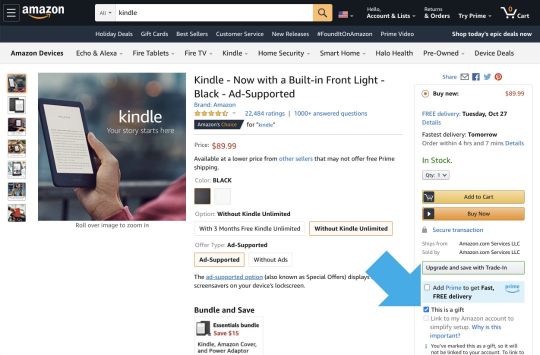
3. Check “This is a gift” box. Make sure another checkbox – “Link to my Amazon account” – is dimmed.
4. Complete the purchase as usual. Make sure to provide the right shipping address.
• • •
Keep exploring. Here are other tips and lists for Kindle users:
[gu-archive number=5 tag=”kindle”]





 Geek Updated
Leave a Reply